AetherSX2 cheat codes are .pnach memory patches tied to a game CRC, the same format PCSX2 uses. They are not Action Replay discs and not a PC cheat engine.
Need:the disc CRC from Game Properties, then a matching .pnach
Enable:Settings → Advanced → Cheats, then boot that CRC
Convert:raw / AR / CodeBreaker lines into pnach patch= format
Backup:write a memory-card save before enabling a pnach
Are you struggling to beat a notoriously difficult boss on your favorite PlayStation 2 classic, or do you just want to unlock everything and go on a rampage with infinite health and ammo? Perhaps you want to skip the endless grinding in a massive 100-hour JRPG. With AetherSX2, you don't need a physical Action Replay or CodeBreaker disc to make that happen. The emulator has a robust, built-in cheating system that lets you manipulate game memory directly using .pnach files, exactly like its big brother, PCSX2 on the PC.
However, setting up aethersx2 cheat codes isn't as simple as flipping a switch in a menu or typing in a password on the title screen. Because you are essentially hacking the game's live memory on an Android device, it requires a bit of file management, finding the correct identification numbers for your specific game disc, and making sure your cheat files are formatted perfectly.
But don't worry: once you understand the fundamental process, it takes only a couple of minutes to get up and running. In this incredibly detailed and comprehensive guide, we are going to walk you through everything you need to know about using cheats in AetherSX2. From understanding how memory patching works at a technical level, finding your game's unique CRC code, to creating .pnach files on Android, and converting raw codes from classic cheat engines. Let's level up your emulation experience!
On this page▾## How Cheats Work in AetherSX2
How Cheats Work in AetherSX2
Before we dive into the technical setup and file manipulation, it is highly beneficial to understand exactly what is happening under the hood when you activate aethersx2 cheats. Understanding the mechanics of PS2 emulation cheating will save you a massive amount of headaches when things inevitably go wrong.
The Era of Physical Cheat Devices
Back in the golden age of the PlayStation 2 console hardware, gamers used physical peripheral discs like Action Replay, CodeBreaker, and GameShark. These devices functioned via a relatively clever workaround. You would insert the cheat disc first, which booted up its own proprietary operating system. You would then navigate a menu, select the cheats you wanted, and load them into the PS2's RAM. Then, you would open the disc tray, swap in your actual game disc, and press play.
The cheat software remained active in the background, continuously intercepting the game's normal operations and modifying the game's memory as you played. This allowed the system to freeze your health value at 100%, grant you 99 items, manipulate RNG, or jump your character across the map by feeding false positional coordinates to the game engine.
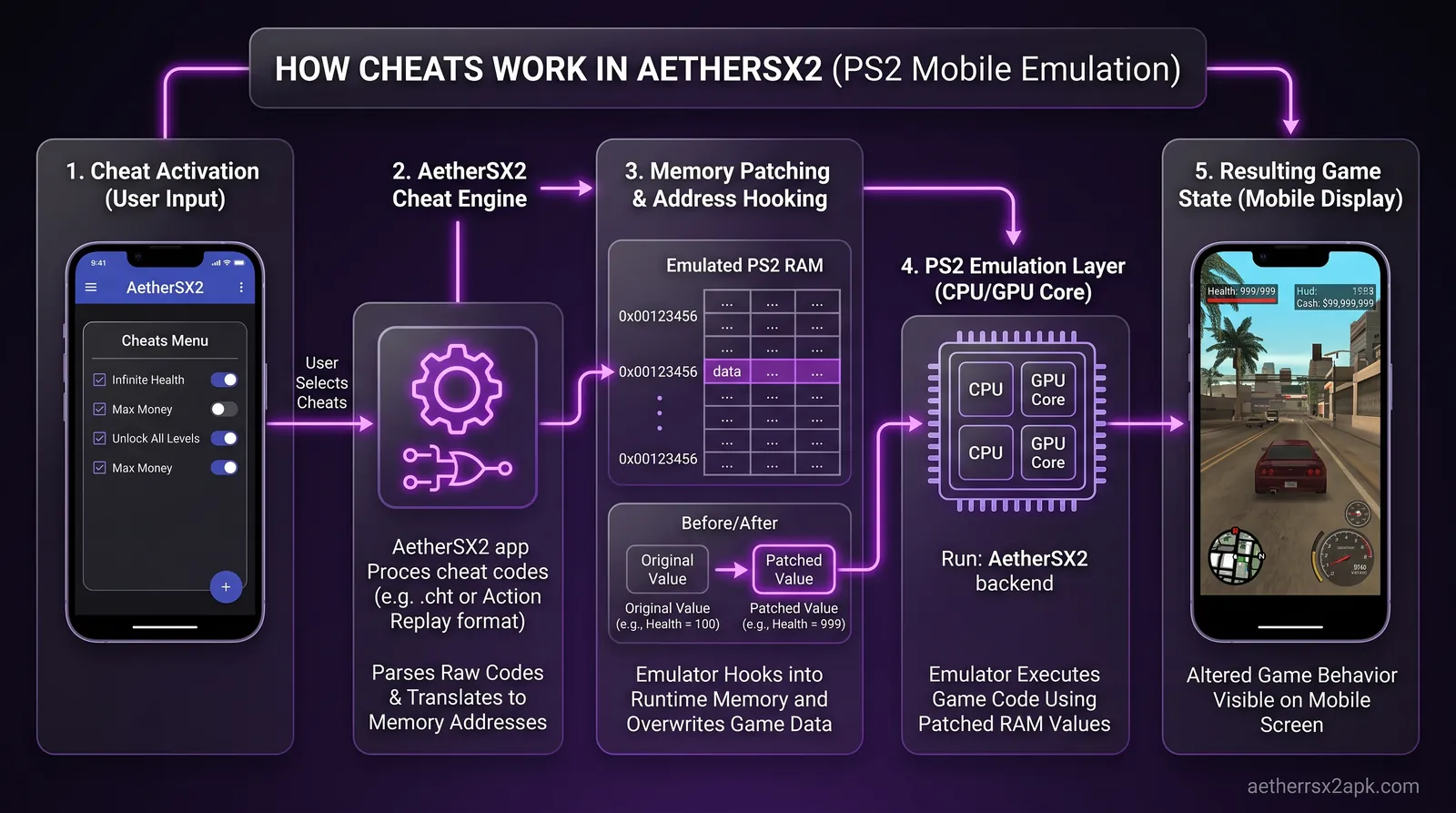
The Modern Emulation Approach: Memory Patching
AetherSX2 does not emulate these physical cheat discs efficiently (though you technically can boot an Action Replay ISO within the emulator, it's incredibly messy, requires disk-swapping workarounds, and is highly prone to crashing). Instead, AetherSX2 uses a native, elegant system called memory patching via .pnach (patch) files.
A .pnach file is a simple, plain text document that contains a list of hexadecimal memory addresses and the specific values you want to inject into those addresses. When AetherSX2 boots a game, it scans a specific folder on your Android device's internal storage for a .pnach file that perfectly matches the game's unique identifier. If it finds a matching file, it reads the text inside and automatically applies those memory patches directly into the emulated Emotion Engine RAM.
Because AetherSX2 was built on the foundation of PCSX2 (the leading PC emulator for PS2), this is the exact same system utilized by the PC community. This means any cheat file created over the last fifteen years for PCSX2 will work flawlessly on AetherSX2, provided the game version matches.
These .pnach patches are incredibly lightweight. Unlike running a heavy Action Replay overlay, memory patches don't impact performance at all, and they can be toggled on or off individually from the emulator's pause menu mid-game. Furthermore, this same .pnach patching system is exactly what is utilized to apply community-made widescreen hacks for games that originally only supported 4:3 aspect ratios.
Finding Your Game's CRC / Serial Code
Finding Your Games CRC Serial Code
The absolute most critical step in using an aethersx2 pnach file is ensuring that your file is named correctly. If the filename doesn't perfectly match your game's unique CRC (Cyclic Redundancy Check) code, AetherSX2 will simply ignore it, and your cheats will never load.
A CRC code is a unique 8-character hexadecimal string generated by the specific ISO or CHD file you are running. It acts as a digital fingerprint for your disc image. It is vital to understand that different regional versions of a game (NTSC-U for North America, PAL for Europe, NTSC-J for Japan), and even different physical disc revisions (v1.0 vs v2.01, or Greatest Hits/Platinum versions), will have entirely different CRC codes.
Step 1: Boot Your Game in AetherSX2
To find your game's specific CRC, you need to open the AetherSX2 app and boot the exact game you want to cheat in. You must load the game normally; do not just look at it in the game grid list.
Step 2: Open the Pause Menu
Once the game is actively running (you can be sitting at the title screen or loading a save, it doesn't matter), swipe in from the left side of your Android device's screen (or press your connected controller's pause/menu button) to open the AetherSX2 quick pause menu.
Step 3: Check the Info Tab for the CRC
Tap on the "i" (Information) icon located at the top of the pause menu interface. This will bring up a diagnostic overlay showing the emulator's current status, rendering metrics, and disc information. Look closely for a line explicitly labeled Game CRC. It will look something like this example: CRC: 0x1A2B3C4D.
The 8 characters immediately following the "0x" (in this example: 1A2B3C4D) is your game's unique CRC identifier. Write this 8-character code down carefully or copy it to your clipboard. Your .pnach file must be named exactly this string of characters, followed by the .pnach extension (for example, 1A2B3C4D.pnach).
Note: In the same information menu, you may also see a Serial Number (like SLUS-20001 or SLES-50005). While the Serial Number is incredibly helpful for finding the right cheats online via Google searches, the emulator exclusively uses the CRC to recognize and load the patch file. Do not name your file after the Serial Number.
How to Create and Edit .pnach Cheat Files for Android
How to Create and Edit pnach Cheat Files for Android
Now that you possess your game's CRC code, you need to create the actual cheat text file. Since modern Android operating systems (Android 11 and above) feature restrictive file management regarding the Android/data folder, you will need a reliable text editor and a capable third-party file manager.
Essential Tools Required:
A Text Editor App: Any basic coding or plain text editor will work perfectly. Apps like QuickEdit Text Editor, Acode, or even the built-in text viewer in some advanced file managers are ideal. Do not use Microsoft Word, Google Docs, or Samsung Notes. These word processors add hidden rich text formatting (like fonts, bolding, and margins) that will completely corrupt the file and render it unreadable by AetherSX2.
A File Manager: ZArchiver, Solid Explorer, or MiXplorer are highly recommended. You need an app capable of requesting special permissions to navigate into the hidden Android/data directories where AetherSX2 stores its user files.
Formatting the Pnach File Structure
Let's say you want to create a cheat file for Final Fantasy X. You have scoured the internet and found some .pnach format codes on a forum that look like this:
Open your text editor application on your Android device and paste those raw codes into a completely blank document.
You can (and absolutely should) add text comments to your
.pnach file to keep things organized, especially if you are pasting dozens of codes. Any line starting with a double forward slash // will be completely ignored by the emulator. This allows you to label what each string of code actually does. For example:
`text
// Max HP for Tidus patch=1,EE,20317548,extended,0000270F patch=1,EE,2031754C,extended,0000270F
// Max MP for Tidus patch=1,EE,20317550,extended,000003E7 patch=1,EE,20317554,extended,000003E7
`
Once you have pasted your codes and added your organizational comments, save the file. When prompted by the app for a filename, use the exact 8-character CRC code you found earlier and make sure the file extension is specifically
.pnach.
The Most Crucial Step: Android text editors are notorious for trying to be "helpful" by secretly adding a
.txt extension to the end of custom file types. Your final file must be 1234ABCD.pnach. If it ends up being saved as 1234ABCD.pnach.txt, the emulator will not see it. You can verify this by checking the file properties in your file manager.
Step-by-Step Guide to Enable Cheats in AetherSX2
StepbyStep Guide to Enable Cheats in AetherSX2
You have your game's unique CRC, you have found your desired codes online, and you have properly formatted your
.pnach text file. Now it is time to put all the pieces together and activate the cheats within the emulator interface.
Step 1: Locate the AetherSX2 Cheats Directory
Open your third-party file manager (like ZArchiver) and navigate to the directory where AetherSX2 stores its user configuration data. On modern Android versions, this path is almost always located here:
(Note: If you utilized a custom data directory setup when you first followed the APK install walkthrough, or if you are using the NetherSX2 fork, navigate to that specific custom folder instead and look for the
cheats subfolder.)
Step 2: Move Your .pnach File
Copy or move the
.pnach file you just created (e.g., 1234ABCD.pnach) from your Downloads or Documents folder, and paste it directly into this cheats directory.
Step 3: Enable Cheats in the Emulator Settings
Open the AetherSX2 application. Before launching your game, tap the App Settings menu (represented by the gear/cog icon in the top right). Navigate to the System tab. Scroll down through the system options until you find the toggle switch labeled Enable Cheats. Turn this switch to the ON position.
Step 4: Boot Your Game and Verify
Return to your game grid and launch your game. As the PlayStation 2 BIOS screen fades and the game boots up, pay close attention to the on-screen display (OSD) notifications at the top or bottom of the screen. If you set everything up correctly, you should see a brief message pop up saying something along the lines of: "Found 2 Cheats. Applied 2 Cheats."
Step 5: Toggling Cheats In-Game
If you only want to use certain cheats occasionally (like an infinite jump code for a tricky platforming section), you don't have to quit the game. You can toggle individual cheats on and off while actively playing. Open the pause menu by swiping from the left, tap the Cheats icon (it usually looks like a magic wand or a checklist, depending on your emulator version), and you will be presented with a list of all the cheats currently in your
.pnach file.
The names on this list are generated by the
// comments you wrote earlier. You can check and uncheck them as needed in real-time. Unchecking a cheat instantly stops patching the memory.
Converting Action Replay / CodeBreaker / RAW Codes to Pnach Format
Converting Action Replay CodeBreaker RAW Codes to Pnach Format
Sometimes you won't be incredibly lucky enough to find ready-made
.pnach files for obscure or lesser-known titles, but you will find old Action Replay or CodeBreaker codes on legacy cheat websites from 2004. You cannot just paste these codes directly into a .pnach file. Physical cheat devices used proprietary encryption algorithms to hide their codes and prevent users from porting them to competitor devices. These encrypted codes must be converted to "RAW" unencrypted PS2 memory addresses, and then mathematically formatted into the .pnach syntax.
The Anatomy of a Pnach Code
A standard
.pnach cheat line always follows this exact syntax format:
patch=1,EE,XXXXXXXX,extended,YYYYYYYY
patch=1,EE,: This is a command telling the emulator to apply the patch to the Emotion Engine (the PS2's main CPU). It is absolutely required at the start of every single cheat line.
XXXXXXXX: This represents the 8-digit hexadecimal memory address where the specific game data (like health, ammo, or coordinates) is stored in the RAM.
extended: This specifies the data injection type. Almost all standard PS2 cheats use the "extended" type.
YYYYYYYY: This is the 8-digit hexadecimal value you are forcing the emulator to inject into that specific memory address.

Converting Codes Using OmniConvert
To turn an encrypted Action Replay or CodeBreaker code into a RAW
.pnach code, you need a specialized decryption tool. The most popular and reliable tool for this is OmniConvert, a lightweight, portable Windows application used by the emulation community. Unfortunately, there isn't a reliable native Android app for this complex cryptography, so you will likely need to use a PC for this conversion step.
Download and open OmniConvert on your Windows PC.
In the "Input" section on the left, select the format of the code you found online (e.g., Action Replay MAX, CodeBreaker v7+, GameShark).
In the "Output" section on the right, select Unencrypted / Standard.
Paste your encrypted Action Replay code into the left window and click the Convert button.
The right window will immediately display the RAW, unencrypted code. It will usually look like two blocks of 8 characters separated by a single space (e.g.,
201A345C 00000063).
Formatting the RAW Code for AetherSX2
Once you have the RAW code (for example:
201A345C 00000063), you simply plug the first 8-character block into the address slot, and the second 8-character block into the value slot of the .pnach string.
Following our OmniConvert example, it becomes:
patch=1,EE,201A345C,extended,00000063
Add your
// comment above it to label it, drop it into your text editor, save it with your CRC filename, and you have successfully converted an old, dead physical cheat disc code into a modern Action Replay AetherSX2 compatible file!
Troubleshooting Inactive or Crashing Cheats
Troubleshooting Inactive or Crashing Cheats
If you have followed all the steps meticulously and your cheats aren't working: or worse, your game is completely crashing upon boot: do not panic. Live memory manipulation is delicate work. Here are the most common issues you will encounter and how to fix them.
1. The "Cheats Not Found" Message
If AetherSX2 boots up your game and you don't see an OSD notification stating that cheats were loaded, the emulator is simply not seeing your
.pnach file.
Check the filename meticulously: Did you type the 8-character CRC code perfectly? Is it definitely
CRC.pnach and not CRC.pnach.txt? Use a file manager to view file extensions.
Check the folder path: Are you absolutely sure the file is located exactly in
Android/data/xyz.aethersx2.android/files/cheats/? If you are using NetherSX2, the package name will be different.
Check the CRC again: Ensure you grabbed the CRC from the emulator while running your specific ISO file, not by copying a CRC you found on a forum. If you ripped your own disc, your CRC might be different from the one on GameFAQs.
2. Cheats Load, But Nothing Happens in Game
If the emulator OSD states "Cheats Applied" but your health is still draining when you get hit, the file is loading properly, but the codes inside the file are likely pointing to the wrong memory addresses for your version of the game.
Region Mismatch: Did you download NTSC-U (North American) codes, but you are playing a PAL (European) ISO? Memory addresses shift significantly between regions. You must find codes meant for your exact regional ISO.
Version Mismatch: Are you playing a "Greatest Hits," "Platinum," or patched revision of the game? These later pressings have different memory layouts than v1.0 releases.
You can verify your game's region and version by checking our game compatibility database and matching the serial numbers printed on your disc case.
3. The Game Freezes, Crashes, or Features Graphic Glitches
If the game crashes instantly upon boot, or characters start exploding into polygon messes as soon as you load a save, you have injected a bad code that has corrupted the game engine.
Remove Master Codes: In the original PS2 era, Action Replay and CodeBreaker required a "Master Code" (usually a code starting with a 9 or F) to bypass the console's anti-cheat protections. Do not put Master Codes in your .pnach file. AetherSX2 does not need them to bypass security, and applying them will overwrite critical emulator system memory, causing immediate crashes. Delete them from your file.
Bad Conversions: If you converted the code yourself via OmniConvert, double-check your input settings. If you accidentally selected the wrong input encryption format, the output will be garbage data that destroys the game state.
Isolate the Problem Code: If you have 20 different cheats in your
.pnach file, delete them all and add them back one by one, booting the game each time. This process of elimination will help you find the specific code causing the crash. It may also be worth tweaking your AetherSX2 best settings to ensure emulator core stability isn't the underlying root cause.
.pnach files are the PCSX2 cheat format. Authoring rules: PCSX2 wiki cheats, PCSX2 GitHub, and CRC lookup discussions on r/EmulationOnAndroid.
Frequently Asked Questions
Can I download a complete pack of AetherSX2 cheat codes?
Yes, absolutely. Because the
.pnach format is universal across platforms, the massive PCSX2 emulation community has spent over a decade compiling gigantic cheat databases that include ready-to-use codes for thousands of games. You can download these PCSX2 cheat archives (usually distributed as a large .zip file), extract them on your Android device, and copy the entire folder's contents into your AetherSX2 cheats directory. Whenever you boot a game, AetherSX2 will automatically search the folder and pick out the matching CRC file from the thousands available.
Why do some cheats require me to press a button combination to activate?
Some complex codes, commonly referred to as "joker codes," are programmed specifically to only trigger when certain controller inputs are pressed simultaneously (like holding L1 + R2 for a super jump). If your
.pnach file contains a joker code, it functions exactly the same way in AetherSX2. Just ensure your on-screen touch controls or external Bluetooth controller are mapped correctly so the emulator registers the simultaneous button press.
Can I use CodeBreaker AetherSX2 cheats?
Yes, you can use them, but as outlined in the conversion section of this guide, you cannot use them in their raw, encrypted CodeBreaker format. AetherSX2 cannot read CodeBreaker encryption. You must use a tool like OmniConvert on a PC to decrypt them into standard RAW format, and then manually format them into the standard
.pnach structure before AetherSX2 can read and apply them.
Do cheats disable retro achievements in AetherSX2?
If you are using RetroAchievements linked through your AetherSX2 account, yes. Activating the "Enable Cheats" master toggle in the emulator's system settings will immediately and automatically disable Hardcore Mode in RetroAchievements. This prevents any achievements from triggering while the cheats are active, ensuring the integrity of the achievement leaderboards.
Will using cheats ruin my game save file?
It is entirely possible, and you should proceed with caution. Cheats manipulate live RAM, which can easily result in buggy, broken game states (like a story-critical item meant to be unique duplicating endlessly in your inventory, breaking an event trigger). If you save your game onto your virtual memory card while these broken states are active, they will become permanently baked into your save file. Always create a backup in-game save, or utilize emulator save states, before experimenting with new, untested cheat codes.
Why does my game run slower or lag when cheats are enabled?
Standard memory replacement codes (like locking health at 999) do not cause lag or drain CPU resources. However, if you are using highly complex codes that run intensive scripts on every single frame, it can heavily tax the emulated Emotion Engine. If you experience massive frame drops or audio stuttering after activating a large
.pnach file, try turning off some of your active cheats in the pause menu to ease the processing load.
Conclusion
Conclusion
Mastering the use of AetherSX2 cheat codes opens up a whole new, exciting way to experience your favorite PlayStation 2 library. Whether you are aiming to skip the tedious grinding in a massive 100-hour JRPG, unlocking hidden developer debug menus, or just having a chaotic blast with unlimited rockets and invincibility in an action shooter,
.pnach files grant you total, granular control over the game's engine.
While the initial technical setup of finding your specific CRC codes, properly formatting
.pnach` text files, and converting old encrypted Action Replay codes might seem a little intimidating for a newcomer, it becomes second nature very quickly. Just remember the golden rules: always perfectly match your game's region and version to your codes, avoid using game-breaking Master Codes, and always keep a backup save state handy in case things go awry.
Now head over to the APK download hub, grab the latest stable build, then come back here to load your cheat files.